

The WooCommerce Product Add-ons plugin is a popular choice for adding extra options and customizations to products in a WooCommerce store. Many store owners find that it offers several advantages over other product add-on plugins.
One of the plugin’s advantages is its wide range of customization options. Store owners can add different types of options to their products, such as text fields, checkboxes, and radio buttons. This lets them offer a broad range of choices and customizations, making it easy to create unique, personalized products.
WooCommerce Product Add-ons is also highly flexible, allowing store owners to add options to individual products or entire product categories. This flexibility means you can create custom options for specific products, or global options that apply to all products in a particular category — tailoring product options to your exact needs.
Lastly, the plugin is backed by a great customer support team, available to answer questions and help troubleshoot problems.
Overall, WooCommerce Product Add-ons is a powerful, user-friendly tool that helps store owners offer a wide range of customizations and options to their customers. Its ease of use, customization options, flexibility, and support for different pricing models make it a great choice for anyone who wants to offer a high-quality shopping experience.
However, it lacks one crucial feature that can make it unusable in many cases: the ability to show or hide extra fields based on other field values.
What Is Conditional Logic?
Conditional logic for WooCommerce Product Add-ons is one of the most requested features according to WooCommerce’s own stats: feature request #1, feature request #2, and so on.
Conditional logic is a feature that allows store owners to show or hide certain product options based on customers’ choices. This can be useful for creating custom product configurations and simplifying the customer’s shopping experience.
Let’s say a store sells t-shirts in different sizes and colors. The store owner could use conditional logic to show only the color options that are available in the selected size. Customers won’t have to sift through a long list of options that aren’t available to them, making it easier to find the product they want.
Another use case is showing or hiding certain options based on what the customer enters in other fields. For example, a store owner could offer a greeting card only when a customer chooses to write something in a text field (a compliment or a message). This encourages customers to pay for extras and gives them an incentive to add more items to their cart.
Overall, conditional logic is a useful tool for store owners who want to create custom product configurations and simplify the shopping experience. By showing or hiding options based on customer choices, you make it easier for customers to find the right options for the product they want, creating a more streamlined shopping experience.
How Difficult Is It to Implement Conditional Logic with WooCommerce Product Add-ons?
Implementing conditional logic with WooCommerce Product Add-ons varies in difficulty depending on your familiarity with coding and the specific requirements of your customization. While the plugin itself doesn’t have built-in support for conditional logic, you can achieve it through custom coding.
To hide Product Add-ons fields based on the state of another field, you would typically use JavaScript/jQuery. Here’s a sample snippet that demonstrates the idea:
// Replace "field1" and "field2" with the IDs or classes of your fields
jQuery(document).ready(function($) {
  // Hide the Product Add-Ons field initially
  $('.product-addon-field2').hide();

  // Watch for changes in the state of field1
  $('#field1').change(function() {
    var selectedValue = $(this).val();

    // Show or hide field2 based on the selected value of field1
    if (selectedValue === 'some_value') {
      $('.product-addon-field2').show();
    } else {
      $('.product-addon-field2').hide();
    }
  });
});
In this example, the code targets the IDs or classes of the fields you want to control. It initially hides the Product Add-ons field (field2) and then uses JavaScript/jQuery to watch for changes in the state of field1. When field1 changes, the code checks its selected value and shows or hides field2 accordingly.
Keep in mind this is a basic example — the actual implementation will vary depending on your specific needs, the field types you use, and the structure of your WooCommerce store. Conditions for text-based fields, file uploads, and others are more sophisticated because of the complexity of the conditions. It’s recommended to consult the WooCommerce documentation or seek professional assistance if you need more advanced customization or aren’t familiar with coding. Or you can find a plugin that already performs this task for you and is well supported to keep up with future Product Add-ons updates.
How Does Conditional Logic Work in Real-Life Examples?
Let me show you an example. Here you have additional wrapping options for your product:
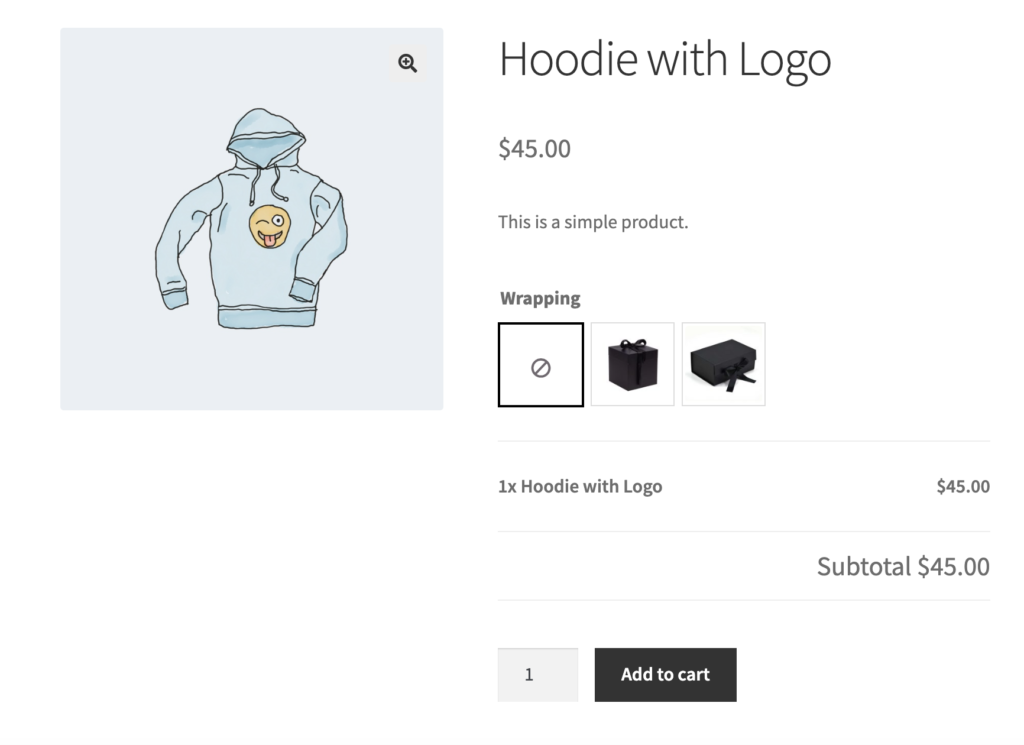
And then a few variations of boxes depending on the size the customer chooses:
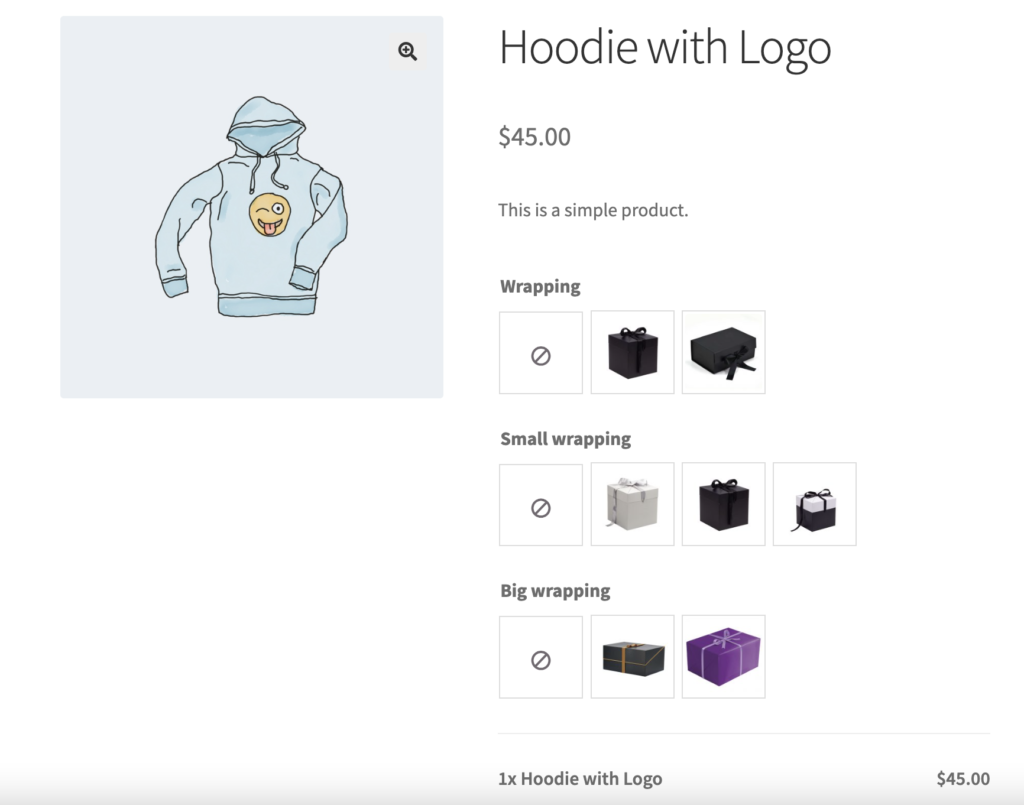
As you can see, both the Small and Big wrapping options are displayed, which may confuse your customers: if they need a small one, they still have to select negative options for the big boxes to proceed. You’d want to display large boxes only when a customer chooses extra packaging, and those boxes should correspond with the size they picked. But you can’t do that with WooCommerce Product Add-ons alone — all the extra fields you create for your products are displayed by default, and you cannot hide or show them.
You could switch to a different product add-ons plugin, of course. But what if you don’t feel comfortable switching, or the alternatives simply can’t match the quality and features of the original Product Add-ons?
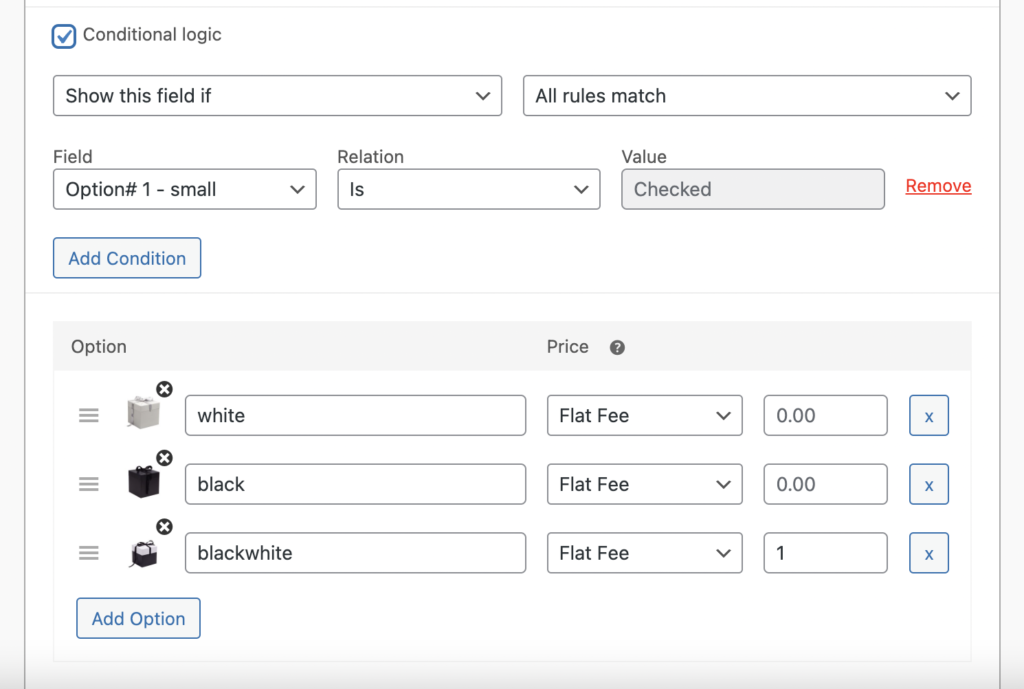
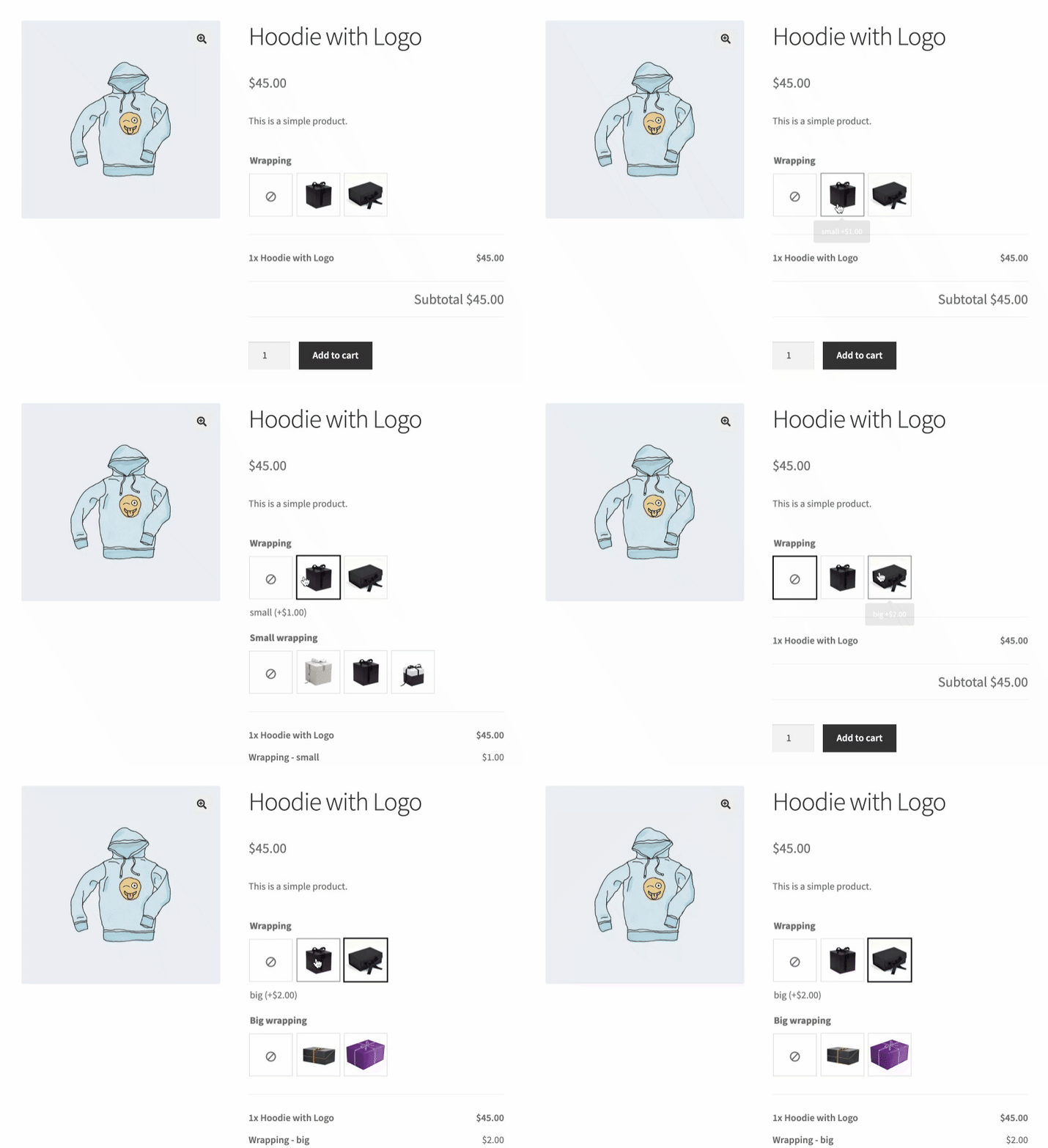
That’s where Conditional Logic for WooCommerce Product Add-ons comes in handy. You can set conditions for when to display or hide particular fields. Just like in our example — show the small package options only when the small wrapping option is chosen:
And then your customers will see only the options that fit their original wrapping choice:
Here are some more real-life examples of how businesses can use WooCommerce Product Add-ons with Conditional Logic:
- Customized Apparel: a clothing brand can let customers customize their clothing — offering different options for fabric, color, size, and style, and using conditional logic to show/hide the relevant add-on fields based on the customer’s selections.
- Event Tickets: an event management company can sell tickets with varying prices and use conditional logic to show additional add-on fields for premium ticket holders, such as VIP parking, backstage passes, or meet-and-greet opportunities.
- Personalized Gifts: an online gift store can offer personalized gifts — letting customers upload a photo or write a personalized message, with conditional logic revealing additional add-on fields such as gift wrapping or shipping options.
- Food Delivery: a food delivery business can offer customizable meals — various options for main dishes, sides, and drinks, with conditional logic showing additional add-on fields based on customers’ dietary preferences or restrictions.
- Home Decor: a home decor store can offer customized furniture — different options for fabric, color, and size, with conditional logic showing/hiding the relevant add-on fields based on the customer’s selections.
In all these examples, Conditional Logic for WooCommerce Product Add-ons lets businesses offer more customized and personalized products while simplifying the buying process — customers only see the add-on fields relevant to them.
How a Clothing Brand Can Use Product Add-ons with Conditional Logic to Offer Customized Apparel
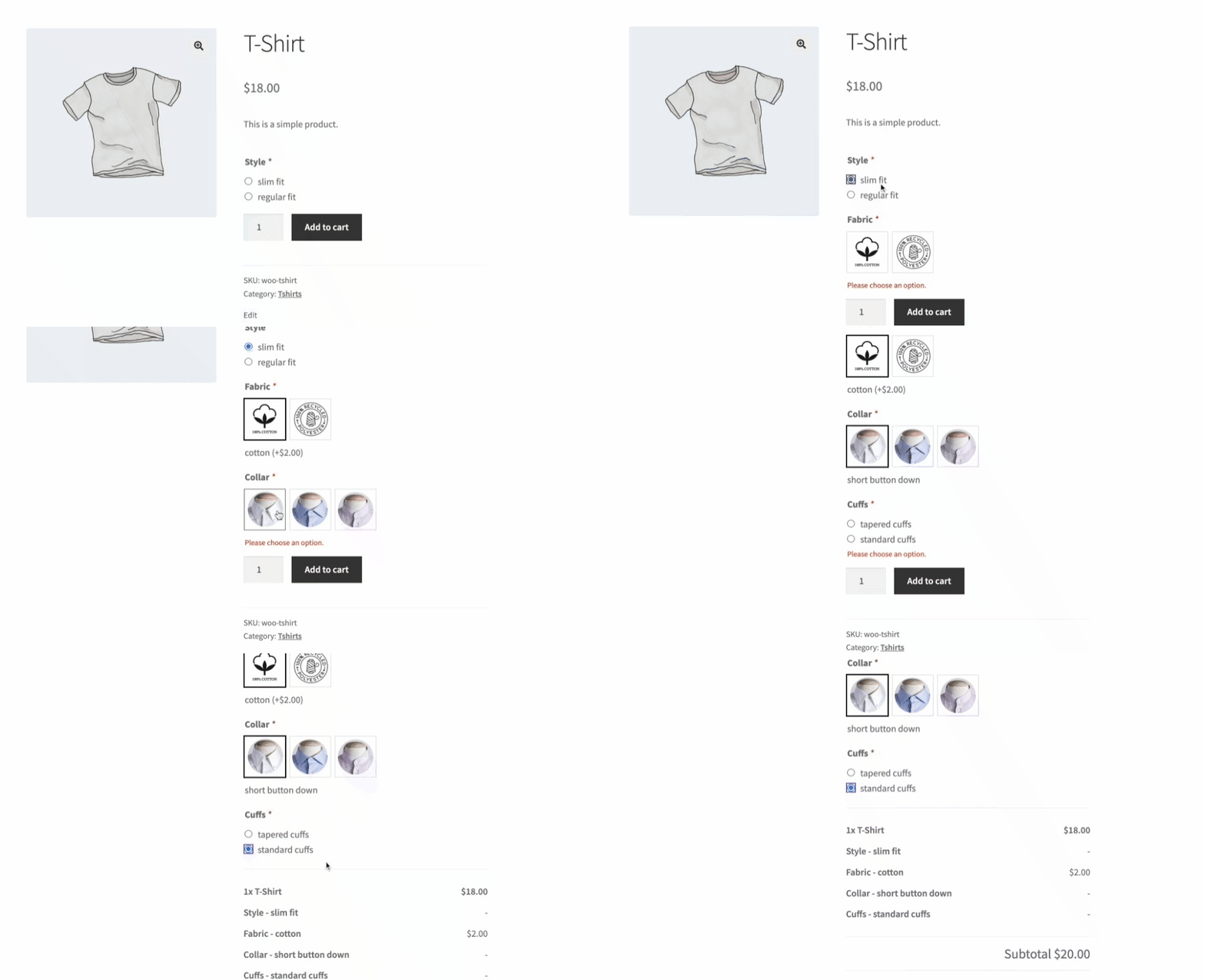
Let’s say you own a clothing brand that lets customers customize their own shirts. Using WooCommerce Product Add-ons with Conditional Logic, you can create a product page where customers select different options for fabric, color, size, and style, and the relevant add-on fields show or hide based on their selections.
For example, when a customer selects “cotton” as the fabric, you can use conditional logic to show add-on fields relevant to cotton shirts, such as “wrinkle-resistant treatment” or “softener treatment”. Similarly, when a customer selects “polyester”, you can show add-on fields relevant to polyester shirts, such as “stain-resistant treatment” or “moisture-wicking treatment”.
You can also use conditional logic to show add-on fields relevant to the size and style of the shirt. When a customer selects “slim fit”, show fields relevant to slim-fit shirts, such as “tapered cuffs” or “narrow collar”. When they select “regular fit”, show fields like “button-down collar” or “standard cuffs”.
By using WooCommerce Product Add-ons with Conditional Logic, you create a seamless, customized shopping experience while simplifying the buying process — customers only see the relevant add-on fields. This helps increase customer satisfaction and ultimately drives more sales for your business.
How a Bakery Can Use Product Add-ons with Conditional Logic to Offer Customized Cakes
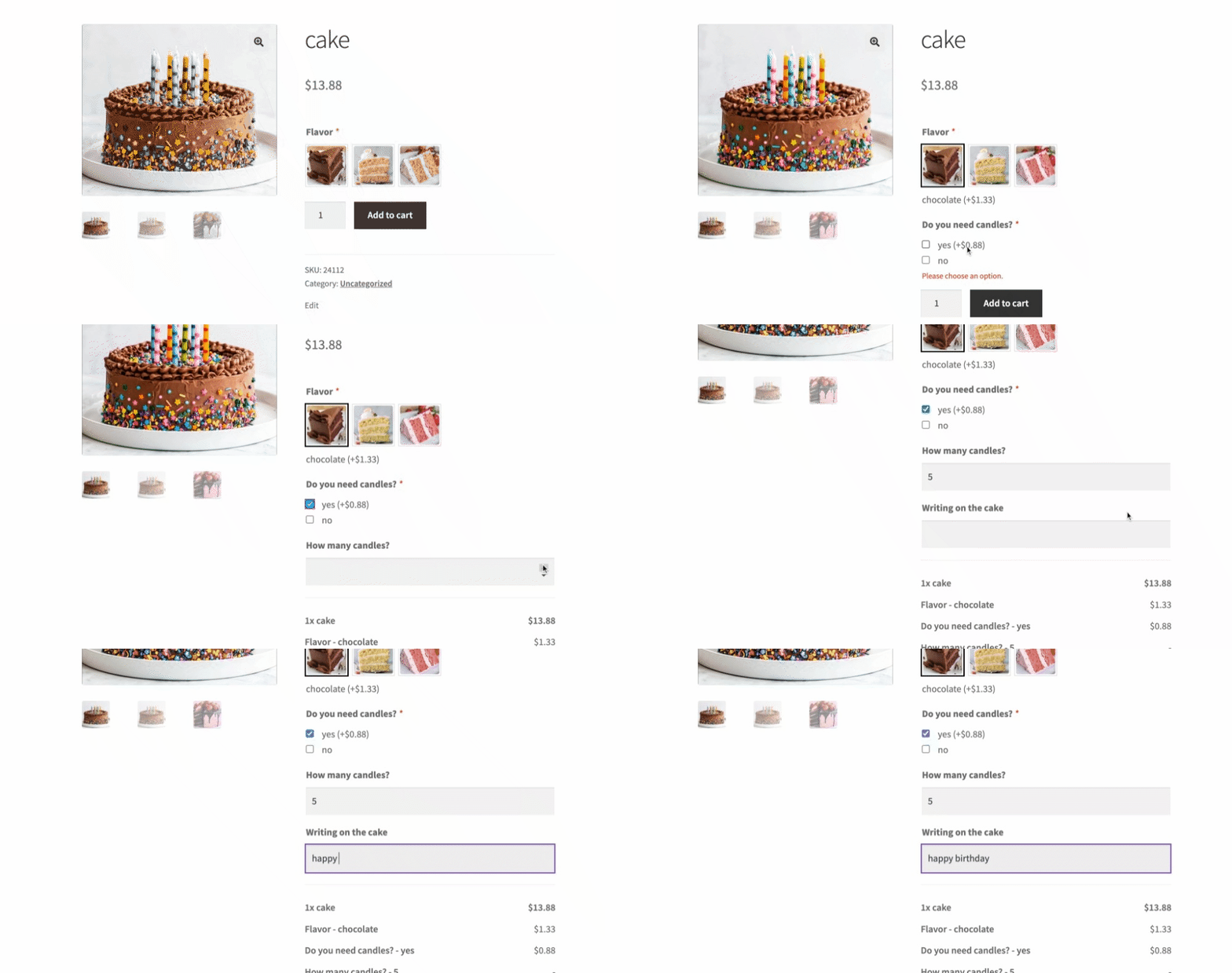
Let’s say you own a bakery that lets customers customize their own cakes. Using WooCommerce Product Add-ons with Conditional Logic, you can create a product page where customers select options for cake flavor, filling, frosting, and decorations, with the relevant add-on fields showing or hiding based on their selections.
For example, when a customer selects “chocolate” as the cake flavor, show add-on fields relevant to chocolate cakes, such as “chocolate chips” or “chocolate ganache filling”. When a customer selects “vanilla”, show fields like “strawberry filling” or “vanilla bean frosting”.
You can also use conditional logic for the occasion and theme of the cake. When a customer selects “birthday” as the occasion, show fields relevant to birthday cakes, such as “candles” or “happy birthday message”. When they select “wedding”, show fields like “bride and groom cake topper” or “flower decorations”.
With WooCommerce Product Add-ons and Conditional Logic, you control exactly which fields are visible for each choice.
Building a Custom Gaming PC Is a Perfect Scenario for Conditional Logic

Imagine an online store that specializes in custom gaming PCs. They offer a wide range of options — GPUs, CPUs, cases, RAM, storage, and more. Using Conditional Logic for Product Add-ons, they can create a streamlined, interactive customization experience for their customers.
Here’s how it can work:
- GPU Selection: when a customer selects a particular GPU (graphics card) model, conditional logic can trigger additional add-on options specific to that GPU. For example, if the customer chooses an NVIDIA RTX 3080, the system can show compatible cooling options or offer an upgrade to a higher-wattage power supply to accommodate the GPU’s power requirements.
- CPU Selection: similarly, when the customer chooses a specific CPU (processor) model, conditional logic can dynamically adjust the available add-ons. If the customer selects an Intel i9 processor, the system can display compatible cooling solutions or suggest additional options for overclocking.
- Case Selection: choosing a PC case is another crucial part of customization. With conditional logic, the store can offer add-ons specific to the selected case. If the customer picks a compact mini-ITX case, the system can show compatible small-form-factor CPU coolers or recommend specific cable-management accessories for a neat, tidy build.
- Storage Options: conditional logic also comes into play when selecting storage. If the customer chooses a large-capacity SSD, the system can suggest additional storage accessories, such as cable brackets or a PCIe expansion card for extra M.2 slots.
By using Conditional Logic for Product Add-ons in the context of custom gaming PCs, the online store provides a seamless, personalized experience. The available options and add-ons dynamically adjust based on the selected components, ensuring compatibility and offering relevant choices. This enhances the overall buying experience, empowering customers to create their ideal gaming rig tailored to their specific needs and preferences.
How a Restaurant Can Use Product Add-ons with Conditional Logic to Offer Customizable Food Options
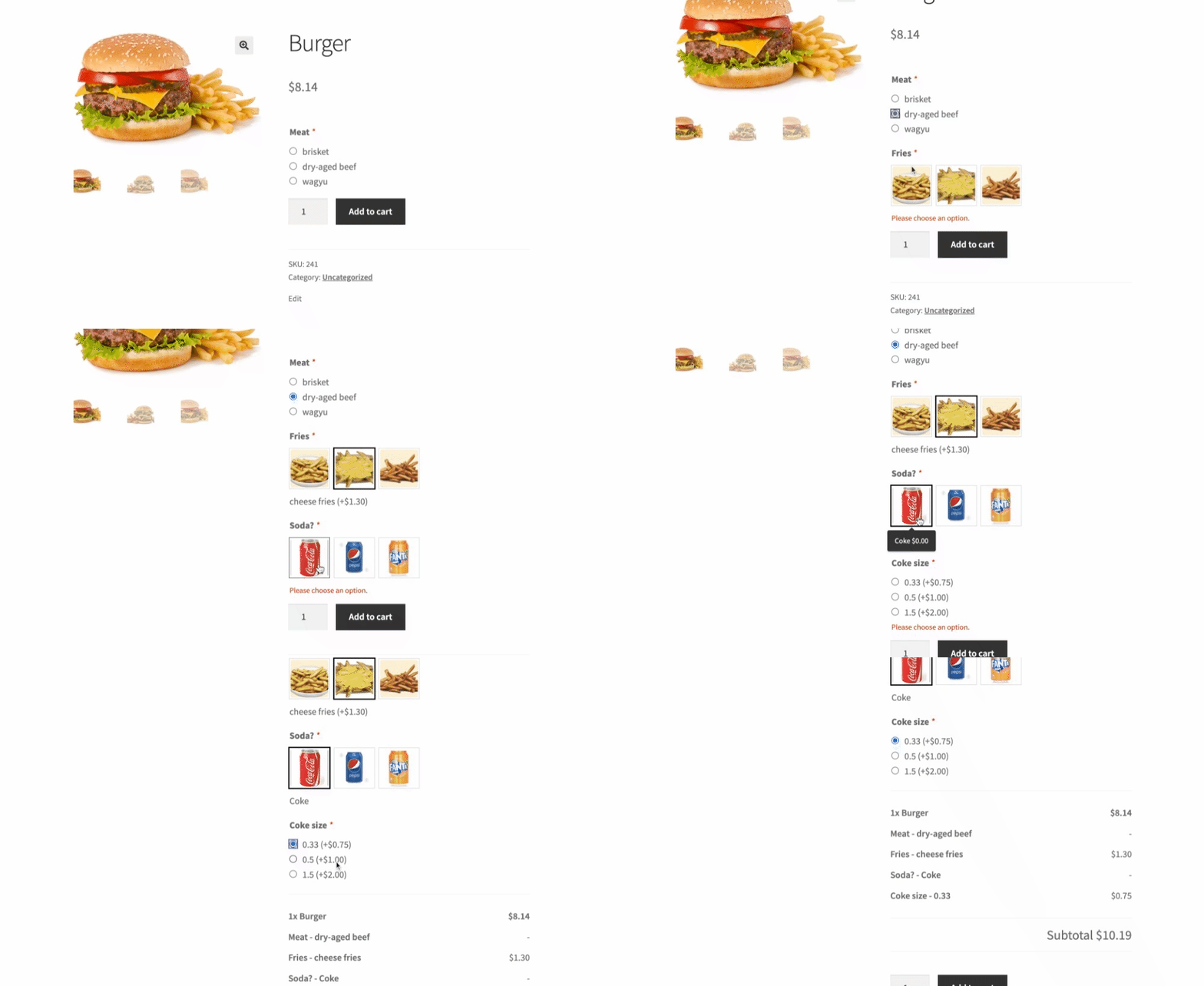
Consider an online food delivery platform that offers burgers as one of its main products. They want to let customers customize their burgers with extras like fries, soda, and toppings. Conditional Logic for Product Add-ons can make this customization process seamless and intuitive.
Here’s how it can work:
- Burger Selection: when a customer selects a burger from the menu, conditional logic can dynamically show the add-on options specific to that burger. If the customer chooses a “Classic Beef Burger”, the system can display add-ons for different types of cheese, sauces, or additional toppings like lettuce, tomatoes, and onions.
- Extra Sides: conditional logic can reveal add-on fields for extra sides like fries or onion rings. When the customer chooses to add fries, the system can display choices for fry sizes (small, medium, large) or seasoning options (regular, seasoned, spicy).
- Beverage Selection: if the customer wants to add a beverage, conditional logic can display the available options — soda, lemonade, or iced tea — with variations in drink sizes (regular, large) and flavors (cola, lemon-lime, orange) shown as add-ons based on the customer’s selection.
- Combo Deals: conditional logic can also be used to offer combo deals or meal packages. If the customer selects a specific burger and adds fries and a drink, the system can automatically apply a discounted price for the complete combo.
By leveraging Conditional Logic for Product Add-ons, the food delivery platform enhances the customization experience: the available add-ons dynamically adjust based on the selected burger, letting customers build their desired combination of extras, sides, and beverages. This level of customization satisfies individual preferences and provides an interactive, engaging ordering process — ultimately improving customer satisfaction and increasing sales.
How an Event Management Company Can Sell Concert Tickets Through Their WooCommerce Store
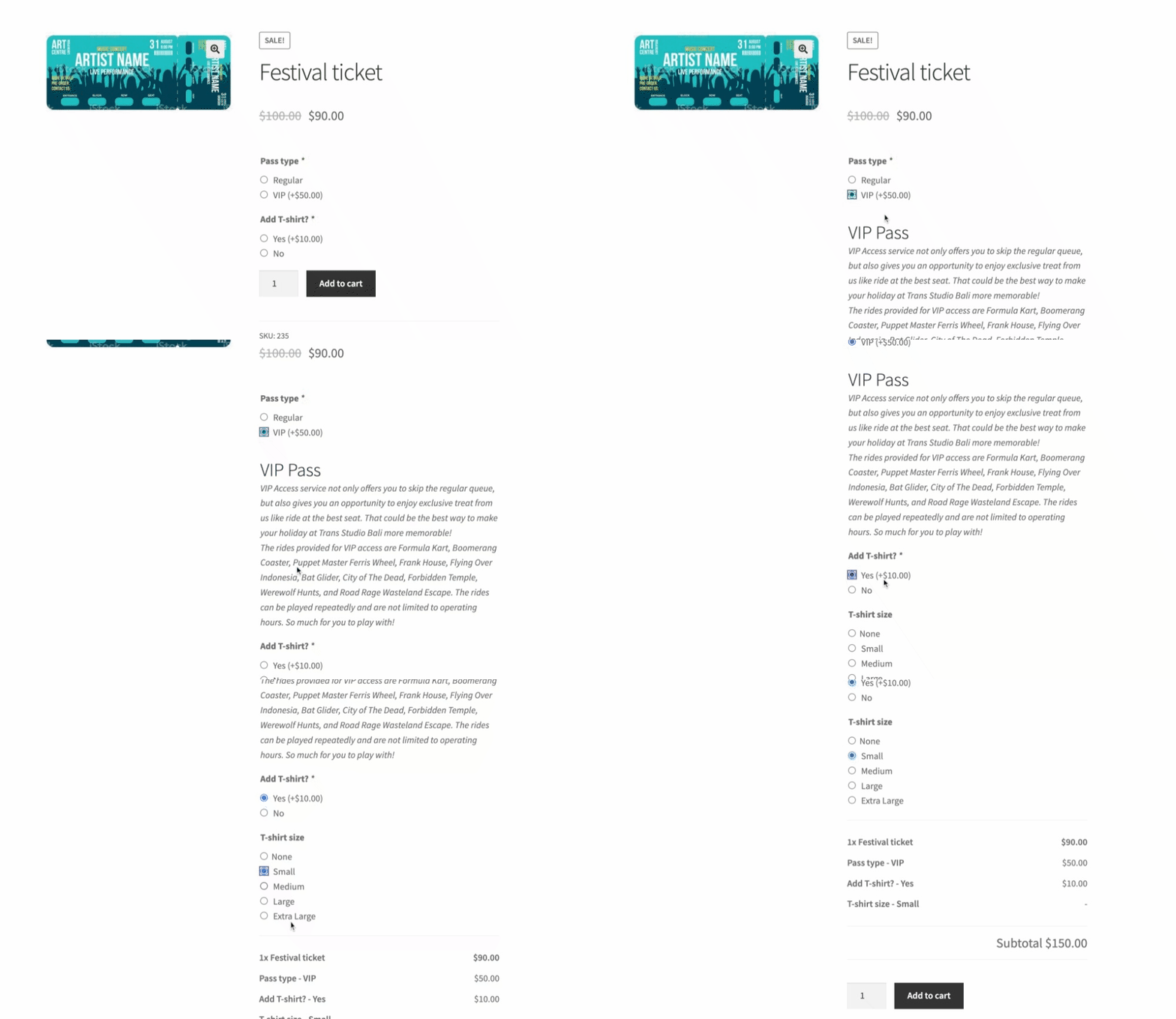
The company wants to offer different types of tickets — General Admission, VIP, and Premium — with varying prices and additional perks.
Using WooCommerce Product Add-ons with Conditional Logic, they can create different options for each ticket type. For example, a checkbox for VIP parking, a text field for the name of the ticket holder, and a radio button for T-shirt size.
Then, using conditional logic, they can show additional fields only for specific ticket types. VIP ticket holders can be shown the options for VIP parking and backstage passes, while Premium ticket holders see additional options for meet-and-greet opportunities.
This way, the event management company offers a customized experience to their customers while increasing revenue by upselling additional perks. Customers choose the options that best suit their needs and preferences — a win-win for both the company and the customers.
TL;DR
The WooCommerce Product Add-ons plugin is a popular tool for adding custom options to products in a WooCommerce store. It offers a wide range of customization options, the flexibility to apply options to individual products or entire categories, and excellent customer support.
However, the plugin lacks a crucial feature: conditional logic. Conditional logic allows store owners to show or hide certain product options based on customer choices, simplifying the shopping experience. While the plugin doesn’t support conditional logic out of the box, it can be added through custom coding — or with a dedicated extension.
Real-life examples of conditional logic include customized apparel, event tickets with additional perks, personalized gifts, customizable food options, and tailored home decor. By using conditional logic, store owners provide more personalized product configurations and streamline the buying process by displaying only the relevant options.