
Discounts for subscription-based products differ from discounts for regular physical or digital products because of their purpose and design. Here we’ll discuss which discounts you may want to use, which plugins are available in the space, and how to set them up. Note: we’re looking at subscription products created by the WooCommerce Subscriptions plugin and All Products for Subscriptions; we don’t cover other plugins that offer subscription functionality.
Coupons for Discounts
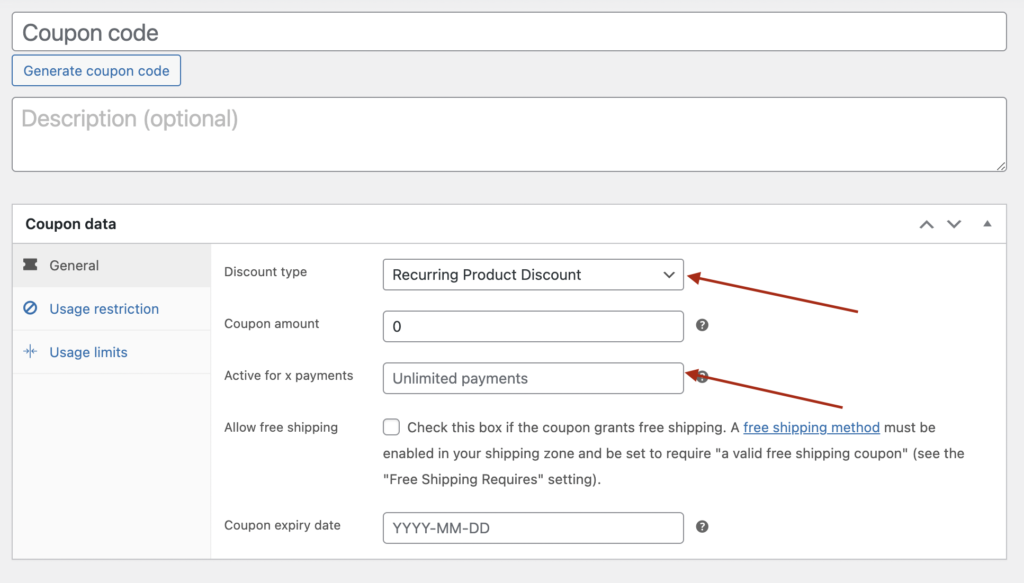
Using regular WooCommerce coupons, you can create Limited Subscription Payment Coupons, meaning the discount assigned by the coupon stays valid for several recurring payments (including the initial payment) — or you can make it work for the whole subscription lifetime. And as usual, coupons can offer two types of discounts: fixed and percentage.
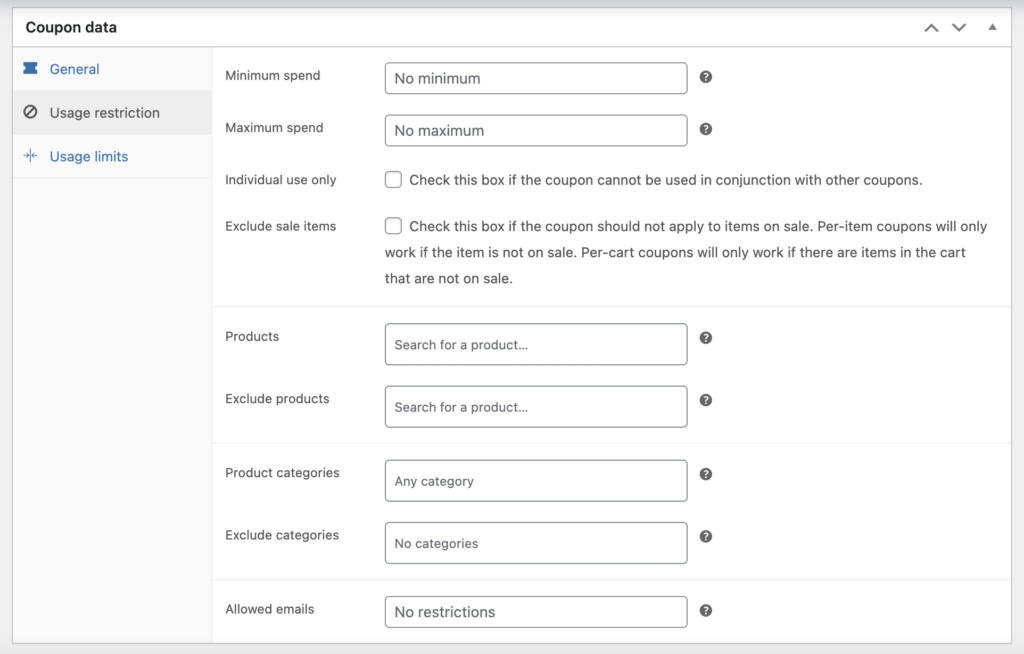
What’s great here is that you can use a wide set of coupon restrictions — from a minimum/maximum cart total to usage limits (number of uses or dates) — and restrict a coupon to particular products or assign it to chosen users.
Using coupons is pretty self-explanatory:
- Create a coupon (WooCommerce > Coupons > Add new);
- Make adjustments and restrictions to the coupon usage scenario;
- Set how many recurring payments the coupon should apply to. If you leave the field blank, the user benefits from the coupon for the entire subscription lifetime;
- Find a way to share the coupon code with your customers;
- Double-check that your customers have the option to enter the coupon code in the cart or at checkout.
Piece of cake!
Plus, you don’t have to install extra plugins to make it work.
There are a few things you can’t do with coupons, though:
- With a coupon, there’s no way to reveal the discounts on the product page;
- Coupons might not be the best choice for mass sales, when you need to offer discounts on a bunch of products to every customer;
- When it comes to recurring payments, coupons aren’t flexible enough — for example, you can’t change the renewal cost from time to time.
But for other cases — when you need to encourage specific users, or have a way to notify all your customers about the coupon (like a mass mailing) — coupon usage is simple and smooth.
When you need coupons with more options, there’s also the Smart Coupons plugin, which can help you set up additional conditions:
- Auto-apply and one-click coupons;
- Location-based coupons;
- Visual coupons;
- And other valuable coupon restrictions.
Discounts on Renewal Payments
For more flexible discount management, there is the Discounts for WooCommerce Subscriptions plugin on the WooCommerce marketplace. This one is helpful when you need to control the cost of each subscription installment individually. While coupons and regular sale-price changes affect the cost for the whole subscription period until the subscriber cancels, this plugin lets you change the cost of any particular renewal.
Let’s say you want to offer discounts only to clients who keep their subscription for more than 3 months. You can easily do so by setting up a discount sequence starting at the 6th subscription renewal — the initial 5 payments come at regular pricing, and the 6th arrives at a reduced price.
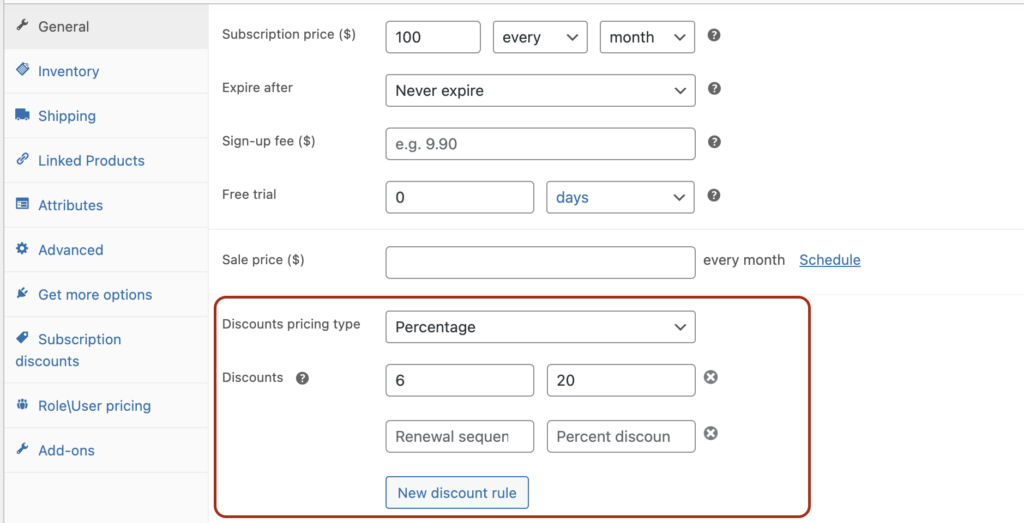
For cases where you need to give away some subscription periods for free, you can set a renewal cost of 0. In the following example, subscribers pay full cost at signup, get 2 months free, and then return to the regular price.
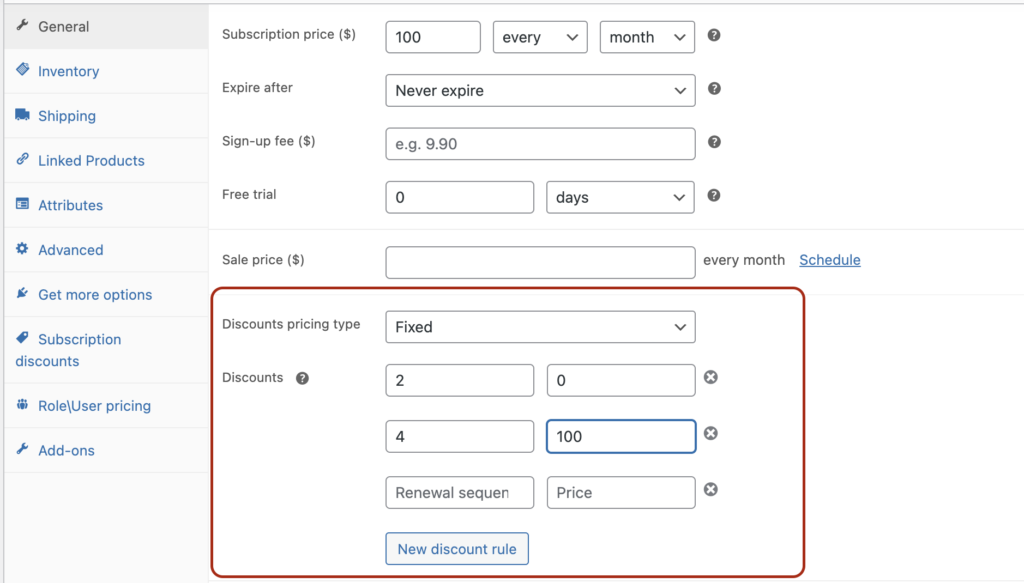
The path to creating discounts based on the subscription sequence:
- Get the Discounts for WooCommerce Subscriptions plugin from the WooCommerce marketplace;
- Go to your subscription product (or other product types, if you use the All Products for Subscriptions plugin);
- Find the “Discounts” area in the General tab (for simple products) or the Variations tab (for variable products);
- Choose the pricing type — Fixed (to set exact prices for each renewal) or Percentage (to calculate the discount from the regular subscription price);
- Check the plugin settings page to show/hide the discount table on your product page and adjust the wording on the product page.
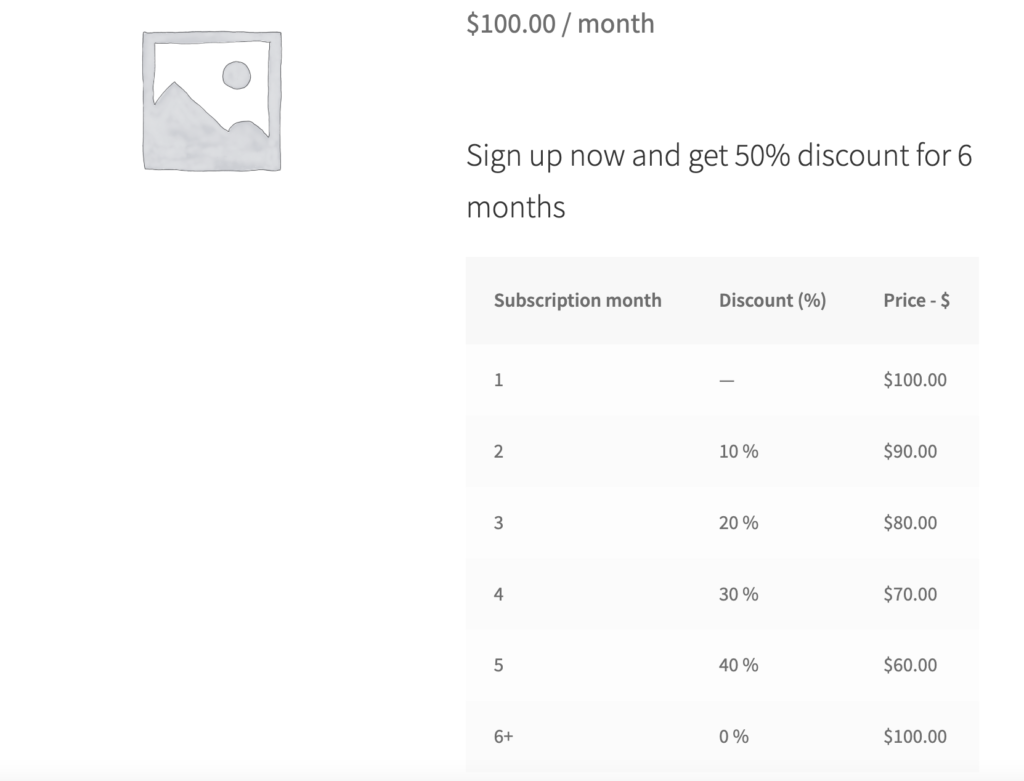
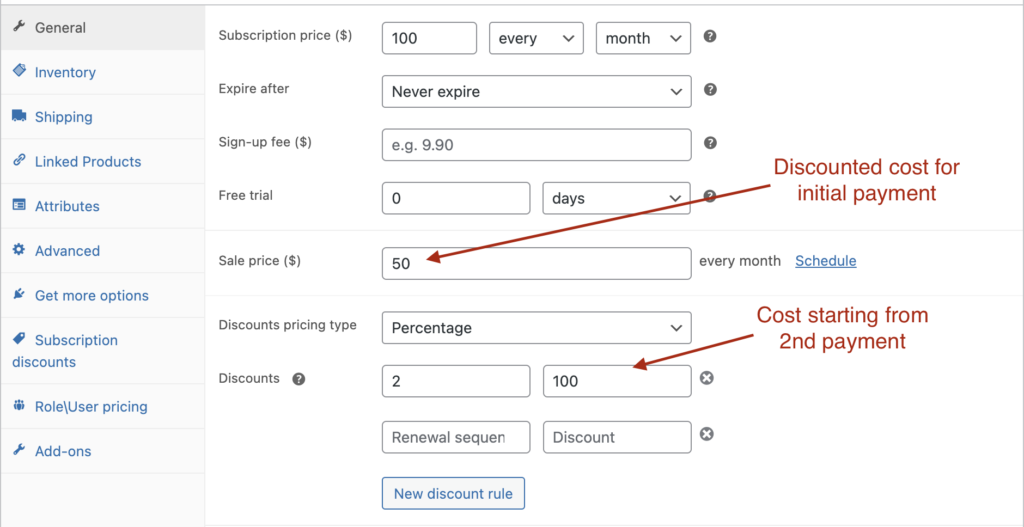
The plugin only controls renewal costs. If you need to change the price of the first (initial) payment, use the “sale price” field for that and then control renewal costs in the Discounts area. With this, you can also give a discount only on the first payment and then revert to full price.
Unlike coupons, the plugin doesn’t require any action from your clients — discounts are applied automatically. And it gives you more instruments to manage the subscription cost along the entire journey.
Discounts Based on User Role
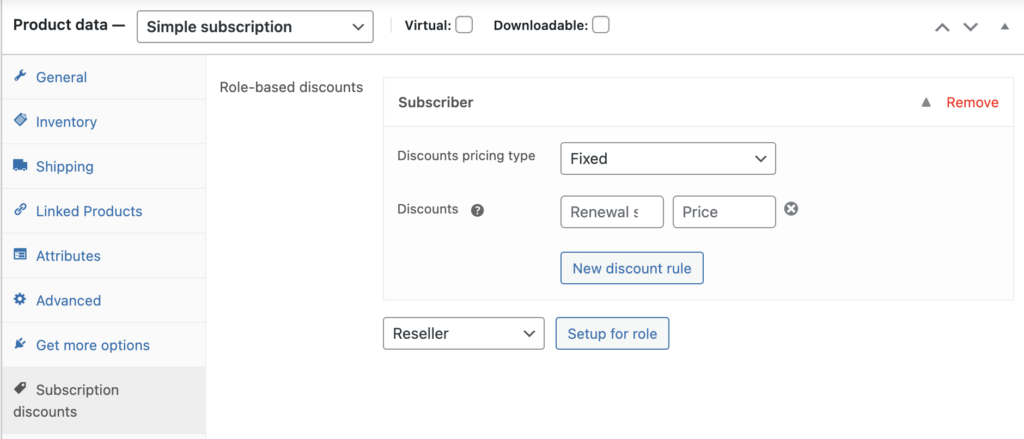
The same Discounts for WooCommerce Subscriptions plugin also gives you the option to set prices based on user role. The plugin can’t create new user roles itself, though — you’d need another plugin to design new (non-default) user roles, or use the default ones. For example, if you want to give discounts to those who are already active subscribers, you can create role-based rules for the Subscriber user role.
Creating pricing based on user role with the Discounts for WooCommerce Subscriptions plugin is very similar to creating regular discount rules:
- After installing the plugin, go to your subscription products;
- Find the Subscription discounts tab;
- Pick the designated user role and click “Setup for the role”;
- Then indicate when the discounts should start and the discount value (or exact pricing).
For cases when you don’t need to manipulate renewal prices and simply want to assign a general subscription price based on user role, take a look at the Role & Customer Based Pricing by Meow Crew plugin on the same WooCommerce marketplace. It comes with a larger set of role-based pricing features, like bulk rule creation (for a whole category or range of products), min/max quantity and quantity steps, and an import/export feature.
Prepaid Plans – Discounts on Long-Term Deals
Another way to offer something your clients will love: discounts for purchasing a longer term. For example, your regular subscription costs $10 per month, and to encourage users to purchase long-term (which leads to higher lifetime value), you offer it for $8 per month if they pay upfront for a whole year.
There’s another plugin for that objective — Prepaid for WooCommerce Subscriptions. Of course, if you run a store with subscription products that don’t need to be delivered every period (monthly, weekly, etc.), you can simply use a Variable subscription and create a separate variant for the yearly subscription. But if you have products that should be shipped monthly and paid yearly (or on any other schedule), you need this plugin to create prepaid plans for your regular subscriptions.
Steps to create prepaid plans for regular subscription products:
- Get Prepaid for WooCommerce Subscriptions from the WooCommerce marketplace and install it;
- Go to your subscription-based products;
- Find the Prepaid section in the General tab (for simple products) or Variations (for variable ones);
- Choose how many subscription installments the prepaid plan should consist of (12 installments for a yearly prepaid plan with monthly delivery);
- Set the cost of the prepaid plan (an exact price or a discount based on the regular subscription price);
- Give the plan a name and set up the interface and string templates used on the product page, so your users better understand how it works.
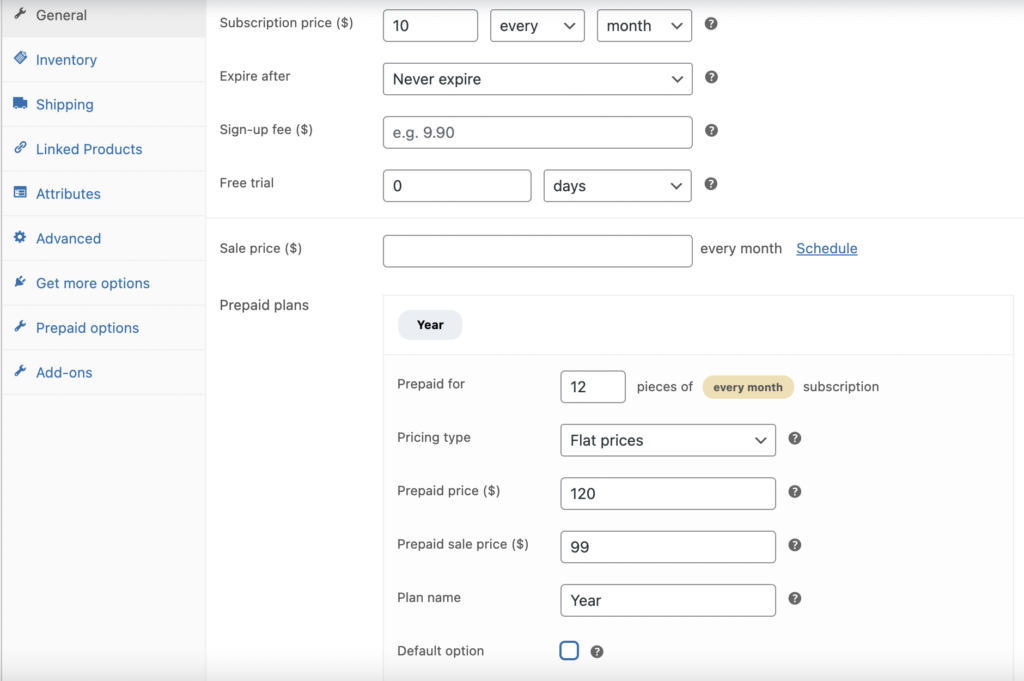
You can also make only prepaid plans available for purchase and choose one of two interfaces for the product page.
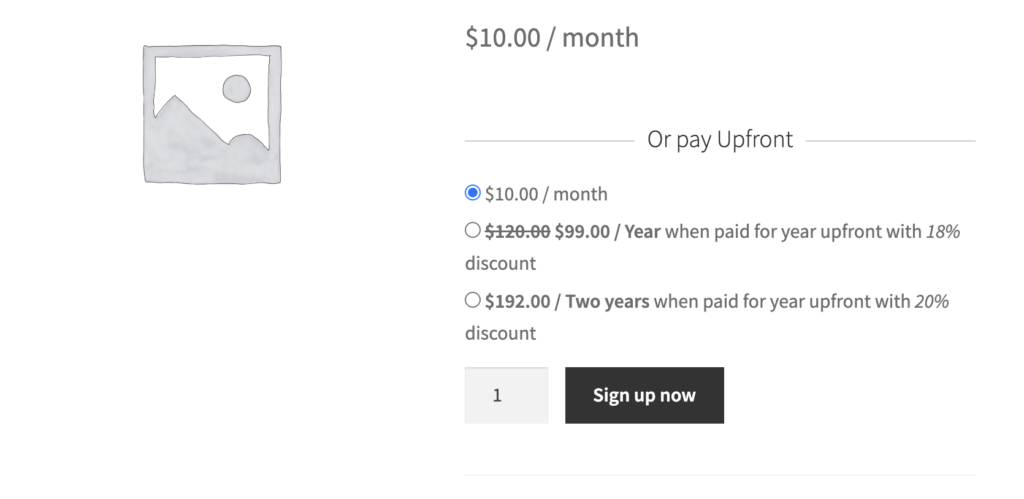
You’re free to create as many prepaid plans as you need and highlight them to benefit both you and your customers.
TL;DR
Regular WooCommerce coupons or the “sale price” field work only when you don’t need to change the cost of particular renewal payments — that is, when you want to change only the price of the first payment or of all future payments.
Discounts for WooCommerce Subscriptions provides a flexible tool for changing the cost of any renewal payment, regardless of when the user purchased the subscription. You can assign discounts (or even increase the cost) for your current subscribers, attract new customers by offering discounts for a period, or even give some subscription installments away for free.
Role-based functionality can also be beneficial if you run some kind of membership business and want to give your members special offers.
Prepaid for WooCommerce Subscriptions can also help you increase revenue and the lifetime value of each subscriber.
Choose whatever suits you best, and let us know in the comments which tool for discounts you prefer.